

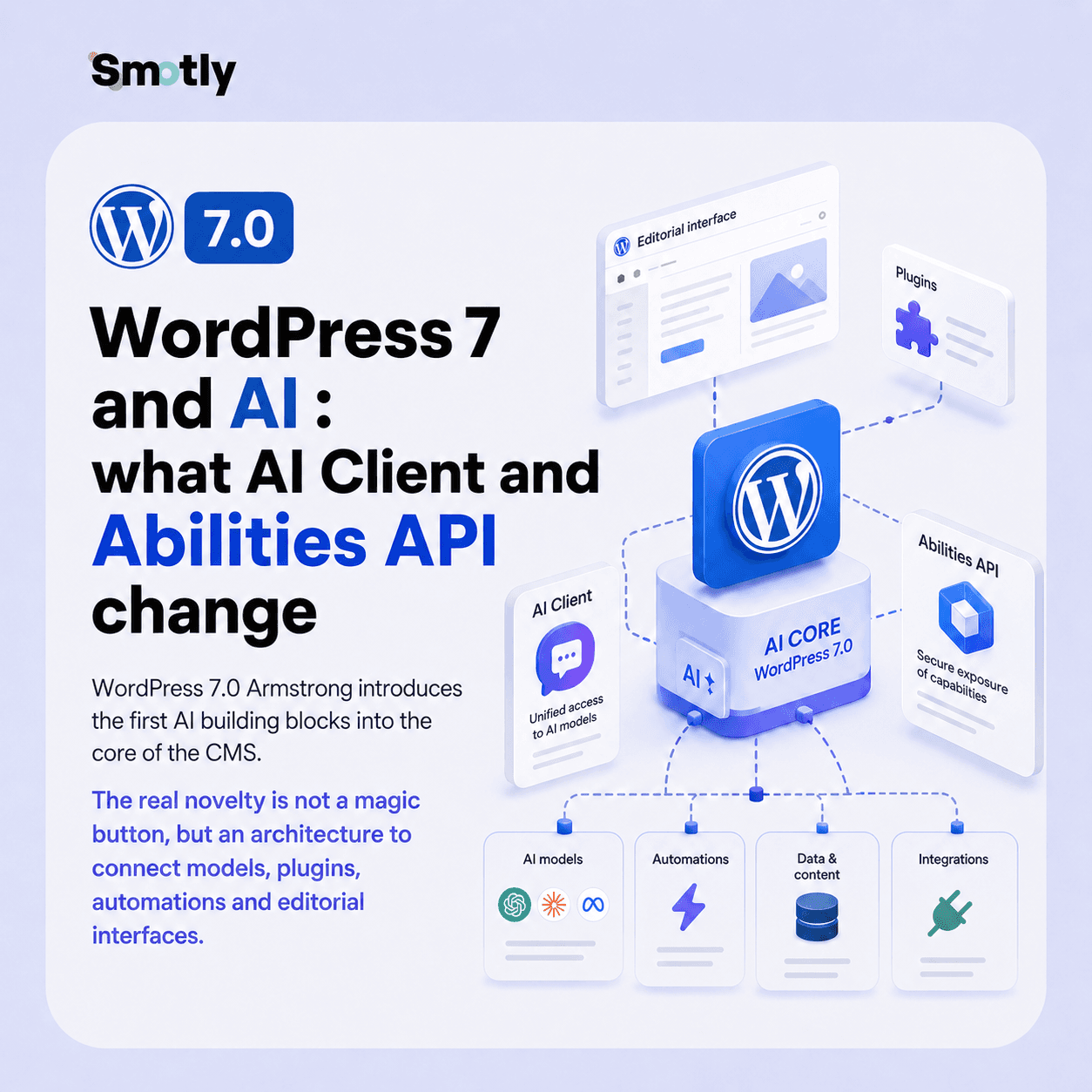
WordPress 7: the real change is the AI layer
WordPress 7.0 Armstrong was released on May 20, 2026. The official announcement emphasizes a strong idea: this version lays the foundations of a new WordPress experience integrated with AI, with a modernized dashboard, new design tools and more than 420 improvements or fixes.
The most structuring part, however, is not visual. WordPress 7 introduces an AI Client in the core, a Connectors screen in the administration, and an extension of the Abilities API on the JavaScript side. Together, these building blocks allow WordPress plugins and interfaces to talk to AI models, declare available actions, and compose more automated workflows.
| Brique WordPress 7 | Role | Impact concret |
|---|---|---|
| AI Client | PHP provider-agnostic interface to send prompts to AI models | Plugins can generate text, images or structured responses without coding a per-vendor integration |
| Connectors API | Registry and admin screen to manage external connections | Anthropic, Google or OpenAI keys can be declared and tracked from common logic |
| Abilities API | Catalog of actions that WordPress, plugins, or agents can discover and execute | An agent can navigate, insert blocks or trigger an action declared with schemas and permissions |
| Plugin IA | Extension of editorial uses above core APIs | Generation of images, titles, extracts or alternative text suggestions depending on the site configuration |
How AI Client, Connectors and Abilities API work
The AI Client is the layer that allows a WordPress plugin to request generation from a model without directly depending on a proprietary SDK. The plugin describes its need, WordPress routes the request to a configured provider, then returns a result that can be used by the code.
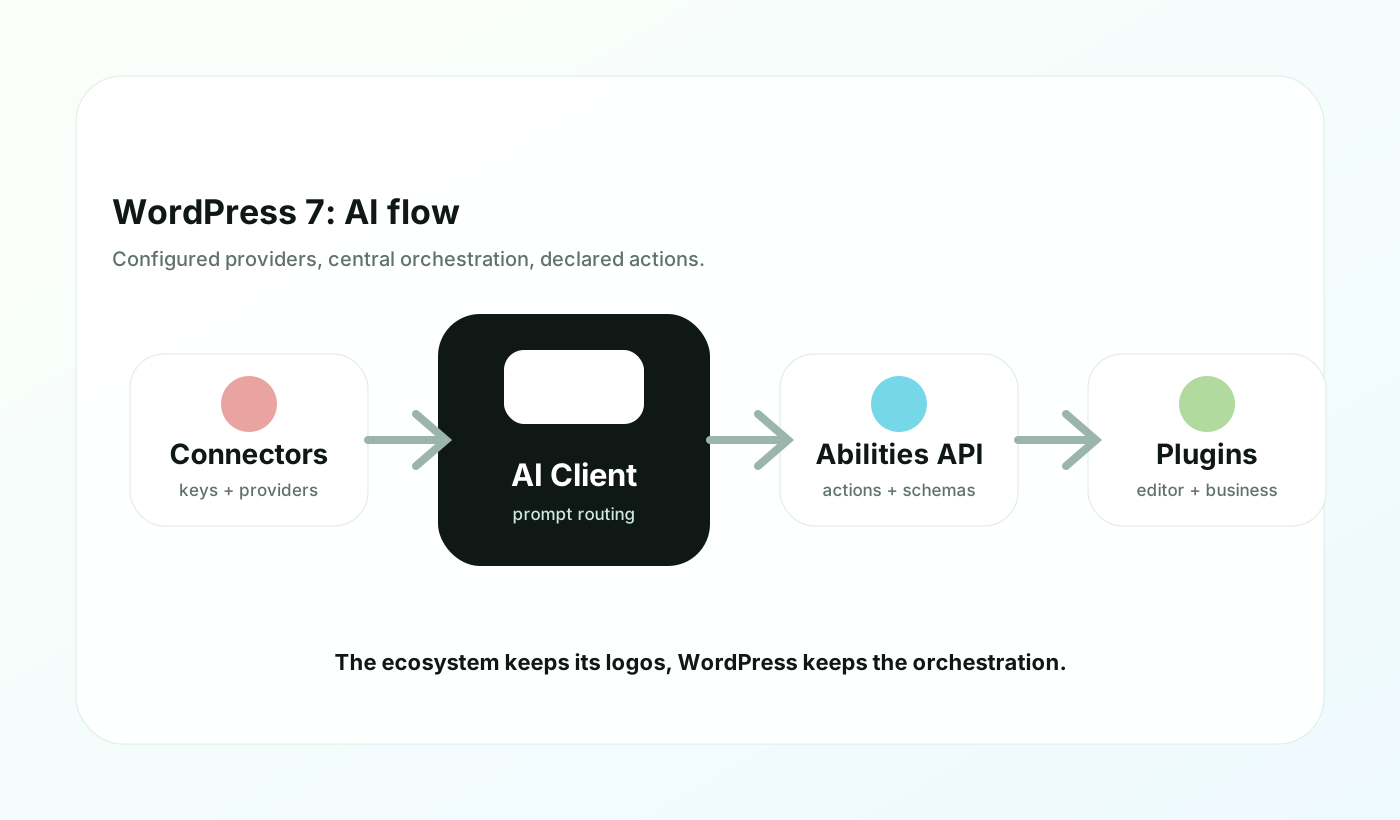
Connectors act as a technical address book. WordPress 7 provides highlighted connectors for Anthropic, Google and OpenAI, and the API can automatically discover providers declared by plugins compatible with the WP AI Client.
The Abilities API completes the system. Introduced on the server side in WordPress 6.9, it receives a JavaScript counterpart in WordPress 7. Abilities can be listed, filtered, executed and protected by permission callbacks. It is this building block that prepares more agentic interactions: an AI tool can understand what it is allowed to do in WordPress, rather than guessing the interface.
The bricks to remember
AI Client
A central API for calling generative models in text, image, audio or other modalities depending on the provider's capabilities.
Connectors
A screen and API to manage external providers, their metadata, installation status and API keys.
Abilities
A catalog of structured actions, with input and output patterns, that interfaces or agents can call.
Capacitance Detection
Plugins can check whether text, image, or audio generation is actually available before displaying an AI feature.
php<?php
$builder = wp_ai_client_prompt( 'Propose un titre SEO pour cette page WordPress.' )
    ->using_system_instruction( 'Tu aides une équipe éditoriale. Réponds en français.' )
    ->as_json_response(
        array(
            'type'       => 'object',
            'properties' => array(
                'title'   => array( 'type' => 'string' ),
                'excerpt' => array( 'type' => 'string' ),
            ),
            'required'   => array( 'title', 'excerpt' ),
        )
    );

if ( $builder->is_supported_for_text_generation() ) {
    $result = $builder->generate_text_result();
}
This type of code does not replace an editorial strategy. On the other hand, it gives WordPress developers a standard interface to integrate AI cleanly: structured result, WordPress error handling, model information and detection of available capabilities.
What AI features are coming to WordPress 7?
The WordPress 7 announcement mentions several uses that are immediately understandable for editorial teams: generating or modifying images, creating titles or excerpts, suggesting alternative texts, and launching abilities from an interface or a command palette.
| Usage IA | Value for the team | Point de vigilance |
|---|---|---|
| Titres et extraits | Accelerate SEO, social or editorial variants | Maintain human proofreading to avoid vague promises or overly generic titles |
| Textes alternatifs | Help populate images and improve accessibility | Validate the real meaning of the image, especially for products, people or regulated content |
| Images generated or edited | Produce quick visual leads for articles, campaigns or editorial blocks | Clarify rights, brand consistency and rules of use before publication |
| Capabilities workflows | Compose several actions: analyze, create a draft, insert a block, prepare a review | Limit sensitive actions like posting, deleting or editing critical pages |
| Business plugins | Expose site-specific actions: catalog, reservation, CRM, intranet, support | Define fine-grained permissions and audit logs by design |
This is where WordPress 7 becomes interesting for a client project. AI is no longer just an external service stuck to the publisher: it can become a declared capability in the WordPress ecosystem, reusable by plugins, administration screens and internal workflows.
Does WordPress 7 have native AI?
Short answer: yes for the infrastructure, no for the model itself. WordPress 7 integrates AI APIs into the core, but generation depends on configured providers, available API keys and installed plugins. A freshly updated WordPress 7 site should therefore not be considered automatically capable of producing AI content.
This shade is healthy. For business sites, AI should not be a hidden mode that appears everywhere without a technical decision. Teams must choose suppliers, manage costs, review data sent to models, and decide which actions can be automated.
What this changes for marketing and technical teams
For marketing teams, WordPress 7 can reduce friction on common tasks: preparing a page brief, proposing an excerpt, adapting text to the brand tone, generating a first version of alt text, or transforming an internal memo into a draft article. But lasting value comes from structured workflows, not from free generation in all fields.
For the technical teams, the novelty is more profound. WordPress plugins can now rely on a common interface to request AI, expose capabilities, and check available capabilities. This limits the multiplication of ad hoc connectors and makes integrations more maintainable.
If your site is already based on WordPress, now is the right time to audit your base: quality of plugins, permissions model, content strategy and desired level of automation. Our WordPress technology page presents our design and maintenance approach, while our AI and automation offering covers business workflows around existing tools.
WordPress 7 migration: testing method
As with any major release, we do not recommend updating a production site without going through pre-production. New AI developments do not change this rule, they even make it more important: they add supplier dependencies, rights and potential costs.
Step 1
Inventory the current site
List the theme, critical plugins, page builders, user roles, forms, WooCommerce if present, and external integrations.
Step 2
Clone in pre-production
Test WordPress 7 with a recent copy, on the same PHP version and the same type of hosting as production.
Step 3
Test career paths
Publish an article, edit a page, place an order, submit a form, check SEO, media and admin rights.
Step 4
Enable AI in a limited way
Plug a provider into a test account, limit users, check costs, and try a non-critical workflow.
Step 5
Deploy with return plan
Backup, upload window, monitoring, log control, editorial validation and documented rollback.
Security and governance: our checklist
The arrival of AI in WordPress must be managed with the same rigor as a payment API or a CRM connector. Connectors can store or reference API keys, abilities can trigger actions, and prompts can contain internal data. It's powerful, so it needs to be framed.
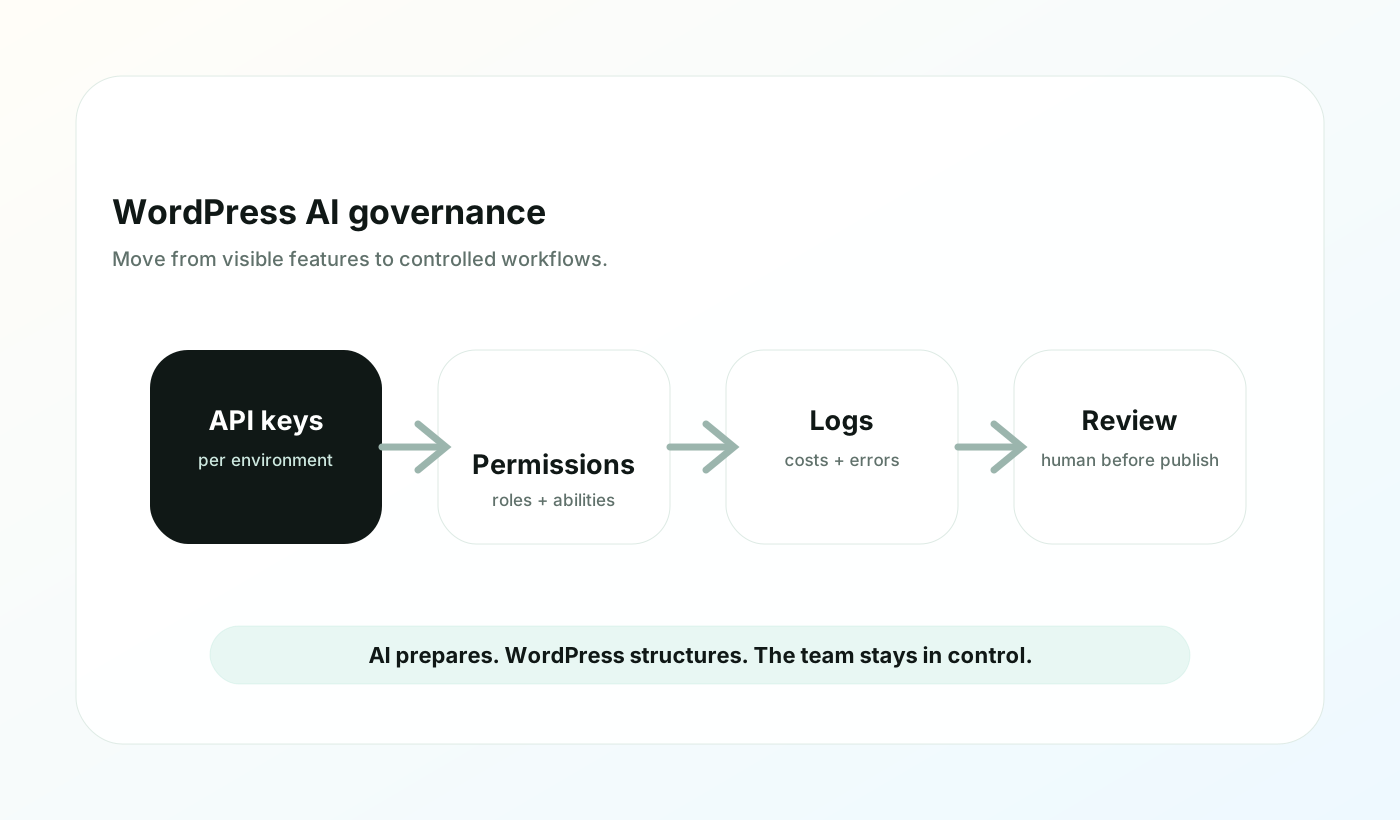
- 1Create dedicated API keys per environment: development, pre-production, production.
- 2Avoid base-stored keys when a host allows secure environment variables or constants.
- 3Limit sensitive abilities: publication, deletion, modification of legal pages, e-commerce actions or customer data.
- 4Document authorized prompts and workflows for editorial teams.
- 5Set up human validation before publication, especially for SEO, legal, medical, financial or product content.
- 6Monitor costs, supplier errors and generated content during the first weeks.
WordPress 7 vs CMS headless IA : quel positionnement ?
WordPress 7 is moving towards more composable logic, but remains a very rich monolithic CMS. For classic corporate, media, blogs, intranets or WooCommerce sites, this AI integration can be very relevant: teams keep their environment known while gaining a layer of automation.
For more complex platforms, a headless CMS like Strapi may remain more suitable, especially when the front, workflows, premises and business data are strongly decoupled. The recent release of Strapi's native MCP server also shows that the movement is general: CMS are becoming action surfaces for AI agents, not just content bases.
| Criterion | WordPress 7 IA | Headless CMS with AI |
|---|---|---|
| Editorial takeover | Very strong for teams used to WordPress | Varies depending on back office and content model |
| Architecture | Complete CMS, plugins, theme, integrated administration | API-first, decoupled front-end, freer integrations |
| IA | AI Client, Connectors and Abilities in the WordPress ecosystem | MCP, custom APIs, agents connected to content models |
| Governance | Depends a lot on the quality of the plugins and roles configured | More technical, but often more explicit in permissions and workflows |
FAQ WordPress 7 IA
Is WordPress 7 compatible with ChatGPT?
Yes, via the OpenAI ecosystem if the connector and API key are configured. But WordPress 7 is not limited to OpenAI: the architecture is provider-agnostic and also provides for Anthropic, Google and other providers declared by plugins.
Do I need to install a plugin to use the AI features?
In many cases, yes. The core provides the APIs and connection management, but the concrete editorial interfaces, AI buttons, workflows and business integrations will be carried by specific plugins or developments.
Can WordPress 7 generate posts automatically?
Technically, bricks allow you to generate text and automate actions. In production, we recommend a draft logic instead: the AI prepares, the team proofreads, then a human publishes.
Is WordPress 7 AI free?
WordPress APIs are open source at heart, but external AI models generally have their own costs, quotas and terms of use. It is therefore necessary to provide for budgetary governance.
Should you update to WordPress 7 now?
Yes if your pre-production tests are conclusive. No if your site depends on unverified critical plugins. For sensitive sites, we recommend a compatibility audit before going into production.
Our Smotly recommendation
WordPress 7 is an important update because it transforms AI into an architectural building block, not just an editorial feature. This is good news for sites that want to automate without increasing the number of fragile integrations.
Our recommendation is simple: start with a WordPress 7 + AI audit. We check compatibility, plugins, roles, data sent to suppliers, then we choose a first low-risk workflow: assisted alt text, draft article, internal summary or generation of title variants.
Sources used
Written by
Thomas
Smotly
We support marketing and technical teams in the design of useful, maintainable and governed WordPress sites, headless CMS and AI automations.
Talk to the team